Daily Calendar
Independent Class Project
Time Span: June 2024 - Aug 2024
Role: UI/ UX Designer, UX Researcher, Prototyper
Skills: Diagraming, Prototyping, Research, Figma, Sketch, Keynote
Concept
Stemming from my need to use two apps to schedule my life, I’ve come up with an integrated task management app that makes it easier for users to coordinate their events and daily tasks.
I've been using two apps to keep track of my schedule; a calendar app to share events with my family, and a to-do app to manage checklist items like homework. I love the integration both have with my phone; I'm able to add widgets to my iPhone so I can keep track of what I need to do daily. My challenge is that I miss information when I coordinate between the two apps. When I'm on my phone, I have a hard time scheduling my week without having my calendar pulled on my laptop.
Want to skip the read and listen to my presentation instead?

User Research
Who am I designing for?
Validating Concept Through Research of Existing Task Management Platforms and Internet Reviews

Actual Customer Feedback
This problem has been around for a while, just doing a quick search for customer reviews online, “no matter how many lists and calendars (our user) makes, (they) can’t keep up.”

Card Sort of Product Elements
The card sort helps break apart features within the task management app that can be divided under standard and fluctuating elements. With task management, there is less of a one size fits all, and there are more options for how the user wants to organize their schedule.
Creating a Problem Statement from the User's Perspective
Design Concept
“When I'm on my phone, which is my primary device, I have a hard time scheduling my tasks without having my calendar pulled up as well.”
-Xavier
Compiling Information to Create a UX Persona
Audience: User X (Xavier)
Xavier is a college freshman who is learning to schedule his time.

Who is User X?
Xavier has a lot of hobbies he wants to make time for.
What motivates him?
Xavier likes to keep organized with a calendar app to track his schedule.
What is his pain point?
Xavier is feeling overwhelmed with managing his coursework.

Design Strategy
In the eyes of my users, what will make my prototype successful?
Setting Up Goals and Success Metrics Curated for My UX Persona
Three Action Items to Achieve in This Short Sprint
Goal 1
The paper prototype demonstrates a happy path through the app based on the product elements.
Xavier can schedule, coordinate, and share events all from one app on his phone.
Goal 2
The task management app highlights days packed with events, so he can schedule his week, preemptively avoiding hectic days.
Goal 3
He can also share events and task responsibilities all within the app.

Prototyping and Testing
For an unreleased project, how can I progress this project beyond the scope of my class?
Creating a Digital Prototype and Testing it on a Real User
Digital Prototype and Feedback
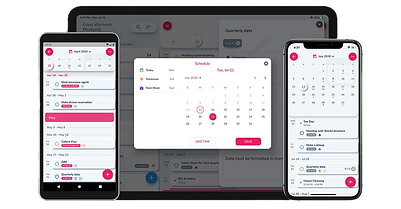
This digital prototype walk-through shows each element of the Daily Calendar app.
Upon creating a digital prototype, I tested it with a typical user who had no exposure to this project before. However, she is currently an avid OneNote user. Her feedback made its way into 3 key ideas that will be incorporated into a future iteration of this product.
Incorporating Feedback to Create Another Iteration
Digital Prototype with 3 Major Modifications

Event Density
Event Density is something I hadn’t explored visually. Each day had one task marker indicating whether or not there was something in that day. It makes sense to add markers that help users spread out events at an immediate glance at their calendar.

Add Assignee(s) to Events
Collaboration was another key takeaway from my usability test. Under the task editor, users may want to share an event with others.

User Profiles
Users should be able to add multiple calendars to their view, so they can coordinate events between their family or coworkers.
Results and Next Steps
